[UPDATE 25/02/2013: iTunes 11 was released towards the end of 2012. It introduces (in the comments Paul points out the column browser function did exist in iTunes before version 11) the ‘column browser’ which allows you to navigate your music collection by multiple ‘facets’. The ‘Column Browser’ can only be used when a list is displayed in ‘List’ (as opposed to ‘Grid’ or ‘Artist’) view. To display the column browser, go to the ‘List’ view for a playlist, then (on a Mac at least) use the ‘View’ menu to ‘Show Column Browser’. Once the Column Browser is active you can decide which fields from the item records display in the column browser.
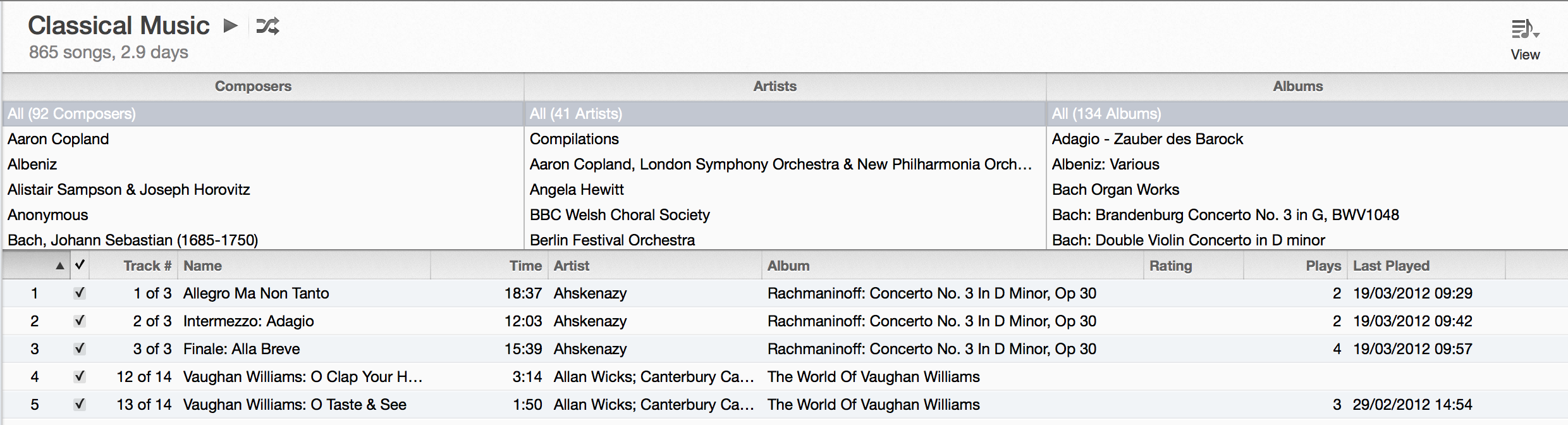
The Column Browser seems to be visible in the ‘Classical’ smart playlist by default, with the three columns chosen as ‘Composers’, ‘Artists’ and ‘Albums’. However, you can also display ‘Groupings’ (which were displayed by default for Classical music in iTunes 10 – see note below).
A final thing to note is that there are a couple of options with the Column Browser which are turned on by default and (in my opinion) work better turned off. These are ‘Group Compilations’ (which means when you have a variety of music on a single disc marked as a compilation, you don’t see these broken down by artist) and ‘Use Album Artists’.]
[UPDATE 29/07/2011: I’ve just noticed that in iTunes 10, if you use the ‘Classical’ smart playlist that comes pre-setup on the software, the display is different from all other iTunes screens, with the Composer appearing automatically on the left, followed by a ‘Grouping’ column, and finally the track listing. I need to have a play around to find what works best, but I think it pushes towards using ‘Groupings’ to define the ‘Piece’ – the iTunes release notes (at time of writing at http://www.apple.com/itunes/features/) say “You can also use iTunes Groupings to specify Works” (for library geeks, interesting use of FRBR terminology there)]
A quick post inspired by Chris Keene who recently asked:
On itunes, should classical music ‘Artist’ be the composer or conductor?
Since I had similar questions around entering classical music into iTunes I thought I’d just note down quickly the method I’ve settled on, and why.
iTunes isn’t really well designed (some would say I could stop right there) for handling music metadata beyond the basic stuff you might need for a collection of popular music. The data entry, and the browse interface, tends to focus on:
- Name (of track)
- Artist (single field)
- Album
While this seems to work relatively well for my collections of pop and jazz (although my jazz collection is small and I’m not so bothered about detailed metadata), it doesn’t do so well for my classical collection. I’m not sure this is a problem isolated to classical music, and I suspect it is about specific forms of music as well.
The type of thing I found didn’t work well was an album containing several pieces of music with multiple movements. So, for example, I had a CD of Anne-Sophie Mutter playing Mozart’s 3rd and 5th Violin Concertos, with the Berlin Philharmonic, conducted by Herbert von Karajan. The track listing on the CD looks something like this:
Konzert Für Violine Und Orchester Nr. 3 G-dur KV 216
1. Allegro
2. Adagio
3. Rondeau. AllegroKonzert Für Violine Und Orchester Nr. 5 A-dur KV 219
4. Allegro Aperto
5. Adagio
6. Rondeau. Tempo di Menuetto
Unlike a typical pop album, this track listing is not a useful in terms of the ‘Album’ (CD). This is where we can immediately see the fact that the physical item (the CD) was an artificial way of bundling two pieces of music together. So the first thing I do is to treat the CD as being comprised of two albums – one of violin concerto no. 3 and one of violin concerto no. 5. Once I’ve separated the music from the physical constraints of the CD, there seems little benefit to treating this as a single ‘album’. This is not always the completely the case – ‘The Kreisler Album’ on which Joshua Bell plays a variety of pieces by Fritz Kreisler is probably still worth treating as an album – I tend to make these decisions on a piece by piece basis.
Back to Mozart and Anne-Sophie Mutter:
Having now got an iTunes Album of Mozart Violin Concerto No. 3, with the tracks:
- Allegro
- Adagio
- Rondeau. Allegro
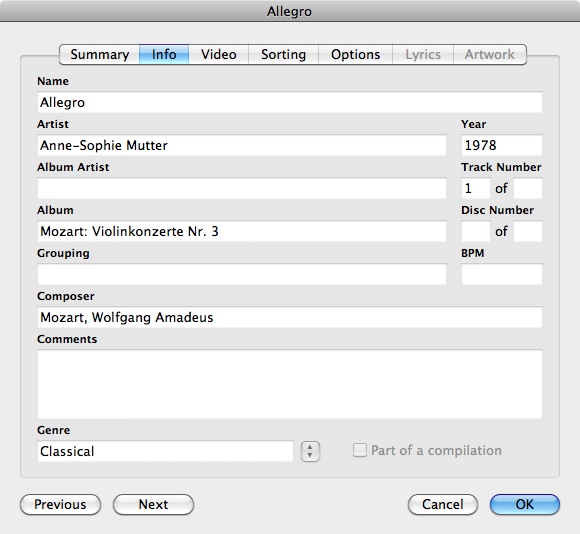
I could enter the details with “Violin Concerto No. 3” as the Album title, and the movements as the track titles. I use the ‘Track Number’ to make sure the movements are going to play in the right order if I play the ‘album’.
I can add Mozart as the ‘Composer’, and I have to make a decision about ‘artist’ – in this case I’m most interested in the fact the soloist is Anne-Sophie Mutter, so this is what I go for, but equally well I could have entered Karajan or even the Berlin Philharmonic – again these decisions can only be made on an individual basis – iTunes just isn’t up to anything more here 🙁 If I want to, I dump the rest of the ‘artist’ information in the ‘Comments’ field. My general rules would be to use the soloist if there is one, and the conductor for orchestral pieces, and if it is a chamber group I’d probably use their name – but these aren’t hard and fast rules – it’s a personal collection, not a library catalogue 🙂
However, even with all this information entered, I still found some irritations when using iTunes to browser my music collection. Although I could add the Composer to the browse interface, it is empty for almost all my non-classical music (and a pain to have an empty column taking up screen estate much of the time), and when sorting by Album, all the Symphonies/Concertos etc. bunch together (as the ‘Album’ is just called “Symphony No. 1”), so I end up having to flick between two columns to know what the piece actually is (i.e. to see the composer is Beethoven etc.)
So, I decided to add the composer information (abbreviated) into the Album title. So now rather than just “Violin Concerto No. 3”, I enter “Mozart: Violin Concerto No. 3”
This is what the entry for the 1st movement of the violin concerto looks like:
And this is how it looks in the iTunes browsing interface:

I have played around with adding numbers in at the start of the movement names (and in some cases the movements of a piece are explicitly numbered anyway), and overall it is far from perfect, but it works pretty well for me.
To answer Chris’s original question, there’s a clear distinction between work and performance. The concept of artist doesn’t work at all; performer or performers is much more helpful though the plural here is, as you point out, significant; the same conductor or soloist may record the same piece with different ensembles, and so on.
I have a four CD set of the Bach 48 Preludes and Fugues played by Davitt Moroney.. Gracenote and iTunes between them manage to offer completely different metadata for each of the four CDs; thus for one the artist will be J.S.Bach, for another Davitt Moroney, for another Johann Sebastian Bach, usw usw.
How do you overcome the very irritating habit iTunes has of thinking in track terms, and therefore breaking up the intergrity of multi-movement pieces into bleeding chunks fit only for ClassicFM (or Radio 3 since its recent dumbing-donw)?
Thanks Tom – yes I agree the basic model in iTunes is lacking here – it would be interesting if there are recommendations for a more flexible (but consumer facing) tool for managing music with more sophisticated metadata requirements.
While I tend to get metadata from Gracenote when I import CDs I have found the approaches taken to metadata very variable as you suggest, so I generally immediately edit it anyway (you can edit multiple items easily just by selecting them and using ‘Get Info’, so it is relatively straightforward to correct the kind of issue you mention).
When you say about breaking up the integrity of multi-movement pieces do you mean when using the ‘shuffle’ function? This is another advantage of treating each multi-movement piece as an iTunes ‘album’ – you can then set iTunes to shuffle ‘By Albums’ (on a Mac this is under the ‘Controls’ menu – not sure if this is the same on a PC?) – and so you can avoid the ClassicFM experience!
Ah, shuffle by albums…never knew that.
There’s also a setting when importing to keep tracks together, but I often forget to use it. The only time I remembered was when importing a recording of the Goldberg variations, but I ended up with one track of all the variations as well as all the individual tracks.
I tend to use shuffle a lot, to take my ears unawares
I use MUSO for organising my classical music – it has everything you need as a classical enthusiast.
http://klarita.net/muso.html
Looked intriguing, but as far as I can see it’s PC only
Thanks for your explanations. My problem is this: the order of classification in the hard disk is by Artist. I don’t like this because i can’t see the complete list of composers but the Artists (Karajan, Muti, etc). ¿Does someone know how to configure the iTunes for classify the music by Composers? thanks
Reply to point made by Ioshmore.
As is clear from numerous comments, iTunes does not help much in managing classical music. My itunes music store is organised by Composer, Work, Movement (or set of joined tracks). In the metadata I switch the content of the Artist and Composer fields and imported music drops into the right folders. The problem is that the browser column titles are also switched. All that iTunes needs is a feature to rename column titles in the browser – not a big deal I would have thought.
I catalogue my classical music like this:
Artist: Samuel Barber
Album artist: Barber, Royal Scottish National, Marin Alsop
Album: Symphony Nos 1 & 2
Then, obviously each individual track name ie: ‘The School For Scandal’ Overture, Op 5
This way each disc appears in itunes in alphabetical order by composers name which helps me find pieces quickly as I have all my music on itunes, rock, pop, classical etc.
I hope this is of help, simple as it may be, it works for me.
Just my two cents … I have over 100 gigs of classical music on my iTunes (over 13,000 tracks) and I find it works perfectly. I just make extensive use of the folders and sub-folders in the sidebar.
For example, in the sidebar, I have:
[Folder] Beethoven
[Sub-folder] Chamber Music
[Sub-folder] Cello Sonatas
[file] Cello Sonata #1
[file] Cello Sonata #2
[Sub-folder] Concerti
[Sub-folder] Piano Concerti
[file] Piano Concerto #1
[file] Piano Concerto #2
If I have more than one performance, I’ll add it to the file name as [Conductor/Soloist]:
[file] Piano Concerto #3 [Davis/Arrau]
[file] Piano Concerto #4 [Davis/Kovacevich]
For operas, I just organize them by date composed:
[Folder] Verdi
[file] 1. Oberto
[file] 2. Un Giorno di Regno
For the actual listings within iTunes, I find the following works best for me:
– Name
– Time
– Size
– Artist
– Composer
– Album
– Plays
– Last Played
– Comments
– Year
For “Name” I just use Track 01, 02 (I’m not a musician, so the descriptive name, i.e. Allegro, isn’t too important for me). I use “Artist” for the name of the conductor, or name of the group, i.e Emerson String Quartet. I use “Album” for the name of the piece, i.e. “Symphony #1: The Bells of Zlonice”
If there’s a soloist, I’ll put his/her name in the comments. If no soloist, I’ll use the orchestra’s name. For operas, I put the major singer’s names in comments. I also use “Year” for the year the music was composed.
I find as long as you pick one way of labeling the music and stick with it, it works great. I think iTunes is incredible for classical music, because you separate all the pieces from the way they were stuck together on a CD. For example, it’s wonderful to be able to open Hayden’s folder, then open the sub-folder for Symphonies and instantly have all 105 in a drop-down list (or instantly be able to scroll through his 67 string quartets, each listed one beneath the other).
It can take a long time to get all your CDs onto iTunes in this way (I’ve been working on importing my collection for several years), but it’s definitely worth it once it’s complete.
Column Browser isn’t new in iTunes 11. In fact it’s had one of the best feature, the ability to be mounted on the left removed.