ILI08 Liveblog

I was at ILI08 today and decided to try out a live blogging experiment using Twitter (as described in this post).

I had some issues with the wi-fi during the day, and for a bit was reduced to blogging on my iPhone, but in general I was able to post to twitter quite well. Using http://search.twitter.com I was able to get the output in a few formats. At this point I was unsure the best way of actually presenting this on-screen as a live blog – I was thinking of something similar to the CoverItLive format, but wasn’t sure how to acheive it.

I fiddled around a bit with Yahoo Pipes to bring together a few separate searches from twitter search (because it limits the number of results returned in a single search to 100 tweets) and also used this to sort the tweets into the correct date/time order. Having done this I could get the results as a single  RSS (http://tinyurl.com/43glub) or JSON (http://tinyurl.com/4zeygw) – but I was unsure the best way to display them in an easily consumable format – I was thinking of something like the CoverItLive format.

I’ve tweeted for some help with this, and if you have suggestions, you could leave a comment here, but what my first attempt is using Grazr, and here is a Grazr gadget displaying the liveblog account, with any comments directed at the live blogging account by other twitterers using the @ostephensili08 syntax.

Grazr

Internet Librarian International 2008

Tomorrow I'm attending Internet Librarian International 2008, and I thought I'd try out a different approach to live blogging.

I've been following some of the live blogging that Andy Powell has been doing at http://efoundations.typepad.com/livewire/ and I had some issues with the CoverItLive tool that Andy was using. A discussion about approaches to live blogging then started on Brian Kelly's UK Web Focus Blog, and I suggested that an alternative approach would be to have a Twitter account for the event, and use that as the live blog feed. I felt this approach would have some advantages – I said:


I can see that not everyone would want to have an RSS item pop up
everytime you finished a sentence, but it would allow much more
flexibility in terms of use:

Pull together all live streams across several live blogs
Searchable after the event
Archivable via an RSS aggregator
Users could choose their own client to view live stream
Can be consumed as push or pull model depending on user choice
Can be read off-line

I’m sure there are other possibilities – the point is that RSS is generally more re-usable etc.


Andy identified some problems for him in using Twitter – particularly the inability to go back and edit the transcript later.

So, since this is the first event that I've been to since that discussion, I thought I'd give it a go.

If you want to comment or contribute to the live blog, get yourself a twitter account by signing at http://twitter.com and then post a tweet starting '@ostephensili08'

You can either view the 'pure' stream – just me tweeting as follows:

Follow ostephensili08 on Twitter
View the Twitter stream at http://twitter.com/ostephensili08
Subscribe to the Twitter RSS feed at http://twitter.com/statuses/user_timeline/16794267.rss

Alternatively you can view the stream with others comments (recommended – bound to be more interesting than just me)

View the Twitter stream at http://search.twitter.com/search?q=from%3Aostephensili08+OR+%40ostephensili08
Subscribe to the RSS feed at http://search.twitter.com/search.atom?q=from%3Aostephensili08+OR+%40ostephensili08

We'll see how it goes!

A month of living paperlessly?

A few things have come together this week which has resulted in me launching myself on an experiment to see how far I can go to living (perhaps more accurately working) without paper.
Firstly, the following exchange on Twitter:
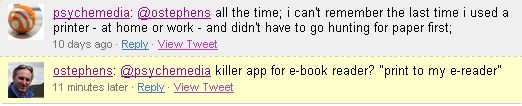
Twitter conversation about ebooks

I had been thinking about e-book readers, as I’d had a very brief chance to play with the new Sony e-reader a couple of weeks ago, I’ve recently installed an e-book app on my iPhone, and this week at work we had a couple of ‘New Technology’ workshops where we had some hands-on play time with various pieces of kit, including an iLiad e-book reader which the library bought last year.

So, I’ve decided to see how far I can use the iLiad to replace stuff I currently print out. I may try some other bits and pieces as well (e.g. RSS feeds using http://www.feedbooks.com/ – thanks again to psychemedia and Twitter for bringing this to my attention – actual e-books, and Newspapers formatted for the iLiad etc.)

So, starting today, for one month, I’m going to give it a go, and see how it works out – I’ll report around November 3rd.
For the moment, here are some first impressions of using the iLiad for this purpose:

I have to admit that the first thing that strikes me is that the iLiad hasn’t gone out of its way to make it easy to use. For a start, the main ‘manual’ doesn’t cover actually getting content from my PC onto the device – for that I have to install special (PC only) software, and read the manual that goes with that.

When I plugin the device, it allows me to ‘name’ the device – but only 11 characters long! It creates a folder structure with the main folder having the same name (so I now regret naming it ‘IC Library’ rather than ‘iLiad’ or similar, because in my folder structure this would have been more obvious). It then (for some reason) also gave an error saying it couldn’t create the folder – even though it actually did this successfully it seems. It also actually creates a whole load of folders – which is confusing to say the least:
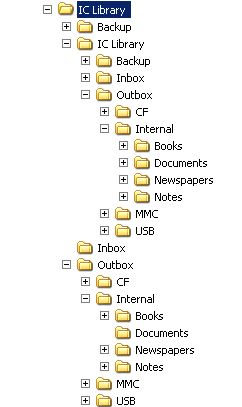
Illiad folder structure

For some reason there is a nested structure that replicates the main one – this doesn’t seem to actually do anything though!

I also install the client software (Windows only), and this isn’t a brilliant design. Interestingly it does have a ‘print clipboard to iLiad’ function – I’ll come to this later.

The easiest format to work with for documents seems to be pdf, although the iLiad also supports a number of e-book formats of course. So, I need a PDF creator – I opt for the free CutePDF – and after installing a PS2PDF converter (available free from the same site), and the CutePDF software, I’m ready to go.

The way CutePDF works is it creates a ‘printer’ which when you print to it, creates a pdf instead. As @paulmiller pointed out on Twitter – with Macs you get this functionality in the system out of the box…

Coming back to that ‘print clipboard to iLiad’ function in the client software, you have to have a ‘pdf printer’ installed, so now I’m ready to go with CutePDF. I setup the client software to use this, and find that what actually happens is it prompts me to save the file – so this turns out to be no different to just using the CutePDF printer option!

I then decide to do a trial run – first I just use an open Excel doc and print it to PDF – CutePDF prompts me to save the PDF, and I do so in one of the iLiad Outboxes. Then I sync the iLiad with the PC. To see if this has been successful, I have to unplug the iLiad, and then navigate to the document menu – it isn’t there. I then try again, and print the pdf to a different Outbox folder – sync again – success!

However, you know what Excel files are like – this straddles 2 pages printed in portrait. So I do the print again, this time in landscape, and after some further problems getting the sync to work, I finally manage to get this onto the iLiad. However, on the iLiad, although it displays OK, it displays the landscape print in portrait – so very small! You can re-orient into landscape on the iLiad, which I do – finally, success and I’ve got the output I wanted in the first place.

Perhaps I started with too hard a test? But if this is going to work for me, I need to find this kind of quirk and work round it. Deleting docs from the iLiad works in an equally bizarre way – but I’m not going to go into the detail here – suffice to say, it isn’t intuitive (for me), and takes me about 10 minutes, and the manual to workout how to do this.

We’ll see how this all goes – and I’ll post further updates here. I want to limit this trial to 1 month so that others in the library can try the reader – so Imperial Library staff, if you are interested then let me/IT Team know…

If you like peas, and you like cheese …

You'll love cheesy peas!

OK, this Fast Show sketch never managed the ubiquity (thank god!) of 'Suits you sir', and doesn't manage the gentle pathos of Ted and Ralph, but it still makes me laugh.

It came to mind reading an article on advertising in this week's Media Guardian which describes a couple of new initiatives to target consumers while they are shopping in store. The first uses facial recognition to work out what demographic you belong to, and then shows an advert on a screen targeted at that demographic. The second, detects the products you take from the shelf using RFID, and uses this to display an advert for a related product. In the article the example used is if you buy Shampoo for a specific hair type, the screen might suggest you get the related conditioner.

 It was this second example that made me think of cheesy peas – the assumption that if I like both cheese and peas, then there will be nothing I will like more than them both together is the kind of reasoning you probably want to avoid with this type of system.

I'm also a bit skeptical of the scenario described – people generally aren't stupid, and know if they use conditioner or not. Perhaps more likely I could see a situation where picking up one brand of shampoo led to a screen saying 'have you thought about trying this rival brand instead – cheaper, better, and altogether shinier' or something like that – so kind of aggressive advertising.

What is all this doing on a blog that claims to be about libraries etc? The other thing this article reminded me of was a discussion on NGC4LIB following the initial publicity about the Microsoft 'Surface'. At the time I suggested the idea of using a book that you already had, to show other books that might be relevant. Since quite a few libraries already have RFID or are going to in the near future, perhaps we ought to be looking at something similar to the system described above (being developed by Proctor and Gamble). Of course, you could argue that this is the whole point of having the books shelved by a classification scheme in the first place – so that the other relevant books are nearby – but clearly any physical ordering is inherently limited. I also wonder if there is a similar argument for books as I've made above for Shampoo – would this type of approach open the possibility of showing books that weren't related to the one you'd just picked up? ("That looks like a really heavy read – how about the latest chick lit for when you want a break?")

Isn't technology brilliant?

btw, I really recommend the Media Guardian supplement (every Monday, and also at http://www.guardian.co.uk/media) as a source of interesting developments relevant to tech and libraries – the way publishing is trying to come to terms with the Internet (or sometimes hoping it will go away) is very interesting, and I think libraries have a lot to learn from looking at their experience (as well as needing to deal with whatever publication formats and models come out next). This Monday was a case in point where they had a supplement (sadly and ironically not available online) about e-publishing including an piece on how Penguin are expanding into e-books, especially in Asian markets, and how their thinking about how books sales work are changing – i.e. think of a million e-book sales as a small title, hundreds of millions is what you want to aim for)

Serious Toys

In a couple of weeks, the Library IT team at Imperial is running a couple of sessions where library staff can come and play with ‘new technology’ – we are focussing on ‘kit’ rather than software or services in this session.

The session is both a chance for staff to see things that the library has for staff use, and also to see some of the latest ‘toys’ that students may be using, or a relevant to libraries.

So far, the list is as follows:

  • Smart Board
  • Digital Cameras (SLR and point-and-click)
  • e-book reader
  • Portable PA system
  • Video Camera
  • Laser pointer/mouse
  • Dictation microphone (plus Audacity recording software)

I’ve suggested we also show

  • Samsung Q1 Ultra (Palmtop)
  • Asus EeePC
  • iPhone
  • eBeam (Smartboard type tech, but without the board)

If anyone has any other suggestions of things we ought to be showing people, please leave a comment.

You Better be Good

As part of our annual staff awayday we had to, in teams, interpret a theme via a chosen medium. Our team decided that it would a good idea to interpret the theme of 'I like my manager when …' to the tune of Santa Claus is coming to town. For those who want to recreate the experience at home, altogether now: 

They better be good
They better buy cake
They better praise us and communicate
We like it when they don't put us down

They reward us when we're winning
Support us when we're tired
We like it when they're honest
And never say "You're Fired"

They better be good etc.

Microsoft get Creative

Microsoft recently (quietly) announced a Creative Commons plugin for Office 2007 that enables you to add a Creative Commons license to your documents (Word, Excel and Powerpoint).

I installed this yesterday, but only got around to having a look at it this morning when I was prompted by a post by Paul Walk about the use of Creative Commons to license his blog posts.

The first thing I wondered is whether the plugin also worked for Liver Live Writer (Microsoft’s blog authoring tool, which I use). No such luck, although Tim Heuer has kindly written a Creative Commons plugin for Live Writer which you can use.

Anyway, back to Office 2007 – I created a new Word document, and started to apply a license. Rather than offering me all the licenses, I first had to ‘create’ a license – a wizard helped me through this step-by-step, although the wording at each stage could have been clearer and more helpful (e.g. the first step asks you to choose between ‘Creative Commons’, ‘Public Domain’ and ‘Sampling’ without any explanation as to what the differences are)

The ‘Sampling’ license intrigued me, as it seemed to relate to something Andy Powell blogged about where someone had taken an entire presentation by Andy from Slideshare (licensed under creative commons), and uploaded to a similar site called ‘Authorstream’. In his post Andy says what he really wants is a license that says “you can take this content, unbundle it, and use the parts to create a new derivative work but you can't simply copy the whole work and republish it on the Web unchanged”. It seemed to me that the ‘Sampling’ license was exactly this. However, when I applied the license to my doc, and followed the link to the license I found this text:

“This license is retired. Do not use for new works.” (at http://creativecommons.org/licenses/sampling/1.0/)

(it seems that the Creative Commons site needs some tidying, as there is still what looks like current information on the Sampling license at http://creativecommons.org/about/sampling)

I should say, it is great to see Microsoft offering the plugin – although there is room for improvement…

RIOJA: Panel Session

The last session of the day – Q and A with panel:

Q: How quickly is change coming, and how can we keep pace with it – specifically in relation to ‘metrics’ such as the REF wants to apply?

A: Metrics are by nature backwards looking – so bound to have some issues with this. Need to engage people like WoS/SCOPUS to look at what they can offer.

By its nature measuring something changes it – we have to constantly review (and change) our measures

Q: How long will libraries continue to subscribe where material is also available via OA?

A: Balancing act – everyone aware of fragility of system – need to keep peer-review, but how it is paid for is a question – while ‘publication’ is the model, need to maintain it.

Q: Libraries can’t afford ‘author pays’ model

A: Not just a library issue – institution need to understand issues and have policy towards OA and how they fund it

Not the biggest issue – the ‘elephant in the room’ is the increase we expect to see from quality research coming out of China and India – unlikely current system will be able to cope with this.

Q: How to physicists use arXiv – do they search? Browse?

A: Get email alerts of new papers each day (or view on website).

Anecdote – physicist saying never used physical copies, but saw them as an ‘archive’ copy (unlike the online version, which they read, but didn’t necessarily see as ‘permanent’)

Comment: OUP has developed number of preservation approaches – dark archive, relationships with Portico, LOCKSS etc. This comes at high cost, and has been led by demands from libraries to publishers – could even see a reversal of this where publishers make demands on libraries for preservation etc. (which is perhaps the model we have with paper!)

Some more discussion which I totally failed to capture – sorry 🙁

Overlay Journal infrastructure for Meteorological Science (OJIMS)

This presentation (the last of the day) by Sam Pepler from a data centre.

The OJIMS project is:

  • Overlay Journal Infrastructure for Meteorological Science
  • JISC and NERC funded
  • Looking specifically at a ‘data journal’ rather than traditional publication
  • Looking to evaluate business models for overlay journals
  • Creating an open access subject based repository for meteorology etc.

The University of Leeds will lead development of a dataset review policy with the Royal Meteorological Socitey (RMetS).

A ‘data journal’ is a journal that links published documents with the data that the publication uses – cf CLADDIER another JISC funded project.

What are the benefits of a data journal?

  • Extend the value of peer-review from papers to data, to provide assurance that data documentation meets the necessary scientific standards
    • Metadata standards
    • Independently understandable
    • Re-useable
    • N.B. about quality of data documentation – not about quality of data set (i.e. “can you use it”, not “is it useful”)
  • Provide an overview of the quality and applications of data, enabling it to be used more easily and appropriately in research and applications
    • adding independent quality statements about usefulness
  • Provide recognition of the work of collecting and describing data
    • High quality, reusable data is not presently a citable resources
    • The writers of papers do not necessarily acknowledge those who collected the data

Why make an overlay journal?

  • Data already in ‘a repository’ – just needs some independent review
  • Because data is bulky, compound and complex – not easy to copy (possibly not as ‘self contained’ as traditional published paper?)

MetRep is a subject based repository for meteorological sciences. This was seen as filling a gap in the market – there is no store for some of the items they want to store. Examples of MetRep items are:

  • Paper from ‘Weather’
  • Set of pictures illustrating cloud forms (e.g. teaching aid)
  • Report documenting a file format for climate models
  • Weather balloon data
  • Recording of a interview with ministers about climate change
  • IPCC reports
  • Logo for a research programme

Although some of these could sit in existing repositories – Institutional Repository, JORUM, websites, etc.

Perhaps MetRep should be an overlay repository? What does it mean to say an item is ‘in the repository’?

So – what is proposed is:

  • Establishing a ‘Overlay document’
    • Metadata about the overlay document
    • Review process information
    • Discovery metadata for the reference document
    • Reference to document (referenceable via a resolvable id in a trusted repository)
  • The ‘review process information’ consists of
    • Version of document in review cycle
      • Submitted
      • In review
      • Published
    • Public comments
    • Description of review process
    • Digital signature?
  • Metadata about the overlay document would contain
    • Author (of overlay no the referenced document)
    • Other DC (Dublin Core) fields
  • Discovery metadata for the referenced document and Reference to document
    • DC metadata harvested from document (not sure if he means from the document, or from the metadata associated with the document?)
    • Resolvable reference to document
    • Other identifiers for document

The overlay repository would have overlay documents pointing to both documents or data

The advantages he sees in this approach:

  • Clear the ‘overlay’ is a document about another document – the two items are distinct self contained
  • Authorship for the referenced and referencing document are allowed to be different – others can submit a document for review
  • The overlay document has the same meaning as a stand alone item – you can take it out of the repository context, and is still meaningful
  • Review mechanisms and repositories do not need adapting to deal with these items
  • You can review a private document/data set – answers the ‘is thing worth buying?’ question

Disadvantages:

  • Authentication issues – might be able to ‘fake’ items?
  • What if the author does not wish for document to be reviewed?

Implementation:

  • Atom XML representation (mention of OAI-ORE here)
  • Already a popular format with many tools
  • Need a tool to create the records
  • Need a web rendering method

Trusting repositories:

  • More than resolvable identifiers – need to believe the object is preserved
  • Need to know what preservation means for complex objects
  • Repositories need to have sound footing – but there are no absolute guarantees

Somewhere along the line I’ve lost the point of what we are trying to achieve with this approach – Sam is now summarising, so hopefully this will help:

  • OJIMS is about widening review processes beyond papers
  • This means storing a wider range of objects – hence MetRep
  • Data is a good e.g. of valued stuff which is not recognised in formal manner – hence ‘data journal’
  • Lots of repositories are already storing the things – hence ‘overlay repository’
  • … didn’t get the last couple of points

Overall seems to be about a way of recording the ‘review process’ alongside the actual object being reviewed.

New models of Peer Review

This session by Ken Carslaw from the School of Earth and Environment for University of Leeds. He is using Atmospheric Chemistry and Physics journal as example.

Atmospheric Chemistry and Physics (ACP) was founded in 2001, run by the European Geosciences Union (EGU). It now has the highest Impact Factor of the 4 Atmospheric Science journals listed by ISI.

Success (they believe) due to:

  • Open access
  • Collaborative peer review and commenting (the most innovative feature in the journal)
  • Speed of publication (two stage publication, with submitted papers available immediately they are submitted)
  • Flexibility (special issues, new article categories, etc.)

A lot being covered in the talk today is available in Poshchl, Learned Publishing, 17, 105-113, 2004

The process started with some basic issues/realisations:

Traditional peer review not an efficient means of quality assurance

  • Limited capacity/competence of editors and referees
    • few editors for large subject areas – limited knowledge of scientific details and specialist referees
    • work overload, conflicts of interest and lttle reqard for referees
  • Retardation and loss of information in Cloased Peer Reivew
    • The right person doing peer review on a paper can make a real contribution – but within closed peer review it may not go to that person (in fact it is unlikely)
  • Spare and late commentaries in Traditional Discussion
    • cf Faraday Discussions – you circulate paper well in advance, then discussion ‘in the round’ at a meeting where paper is presented – get dialogue – they wanted to get that in the published paper environment
    • comment/article ratio has dropped significantly in the last 30 years

Large proportion of scientific publications carelessly prepared and faulty

  • Fraud (rare)
    • selective omission, tuning and fabrication of results
  • Carelessness (frequent)
    • superficial and irreproducible description of experiments and models
    • non-traceable arguments and conclusions, duplicate and split papers

By exposing papers on the web for open peer review, researchers are more careful, as aware that the work will be ‘public’ and reflect on them.

Conflicting needs of scientific publishing: rapid publication vs. thorough review and discussion

  • Rapid publication – widely pursued
    • brief papers, rapid reviews, curtailed review and revision process
  • Thorough review and open discussion – still the exception
    • required to identify scientific flaws and duplications
    • traditionally limited by availability of referees, review time and access to information

Came up with two stage publication with collaborative peer review:

Stage 1 – rapid publication of ‘discussion paper’ (D-paper) – passed by editors, full citeable, typeset and permanently archived

The paper is typeset at this stage, paginated etc.

Followed by public peer review and interactive discussion – to anyone registered – these discussions are also fully citable, and often are, as they contain important information

Stage 2 – review complete, final publication.

Questions about ‘Discussion Papers’

  • Should D paper be paginated?
    • Yes – so it can be cited
  • Should the archive D paper be a ‘journal’?
    • Yes, so it can be cited (not grey literature)
    • Not ISI listed – by lose citations, as many people cite the ‘D’ paper, and don’t bother to cite the final version
  • Should it be reviewed or accepted ‘as is’?
    • A minimum of quality assurance/filtering
  • If the paper is eventually not accepted, should the D-paper be removed?
    • No, Impracticlal Deterrence (don’t want a non-approved paper hanging around)

Now Ken showing the workflow as a diagram… Noting that there has only ever been one instance where they withdrew a comment because it was simply an unsubstantiated attack (I suspect that specific papers could attract particular type of comments – e.g. the original paper on MMR and autism etc.)

The rules for ACP are:

  • Peer reviewers >=2 – can be anonymous or attributed
  • Public commentators – must be registered and are attributed
  • Comments are not review or solicited – should be substantial in nature (although aren’t always)
  • couple more rules I didn’t get…

To see an example go to ACPD website (use Google, I’m not online as I write this!) and navigate to “Most Commented Paper”

The advantages are:

  • All win situation for authors, referees and readers
  • Discussion paper
    • Free speech and rapid publication
  • Public peer review and interactive discussion (collaborative peer review)
    • Direct feedback and public recognition for high uality papers
    • Prevention of hidden obstruction
    • Documentation of critical comments, referee disagreement, controversial arguments, scientific flaws and complementary information
    • Deterrence of careless papers
    • Special issues more collaborative process

Some interesting stats:

  • Get about 5 submissions per month, with rejection rates of these at around 10%
  • Final papers rejections run at about 10% (making 20% in total)
  • Submission-to-publication time is 3-6 months in totla

Impact factor has increased steadily since ACP was established.

EGU (the publisher), has now established 8 interactive OA journals, as well as 2 OA journals with traditional peer-review and 1 subscription journal.

A very interesting model. The journal works on an author pays model – which is a pay on submission (unlike BMC which is pay on publication)

A question – how many of the papers are available in a repository – as far as Ken knows, they aren’t generally (although of course could be happening, and how would they know?)